

Since its release, Harry Potter: Magic Awakened has proved a huge draw for both fans of the series and dedicated mobile gamers. However, the game is also available on PC if you’d like to experience it on a bigger screen. In this guide, we’ll show you exactly how to play Harry Potter: Magic Awakened on PC.
There are a couple of different options to do this and you don’t need any special skills or equipment. So what are you waiting for, keep reading for a step-by-step guide on how to play Harry Potter: Magic Awakened on PC now! Also make sure not to miss our Harry Potter: Magic Awakened Beginner’s Guide and our Tips for Beginners if you are new to the game.
Table of Contents
Is it possible to play Harry Potter: Magic Awakened on PC?
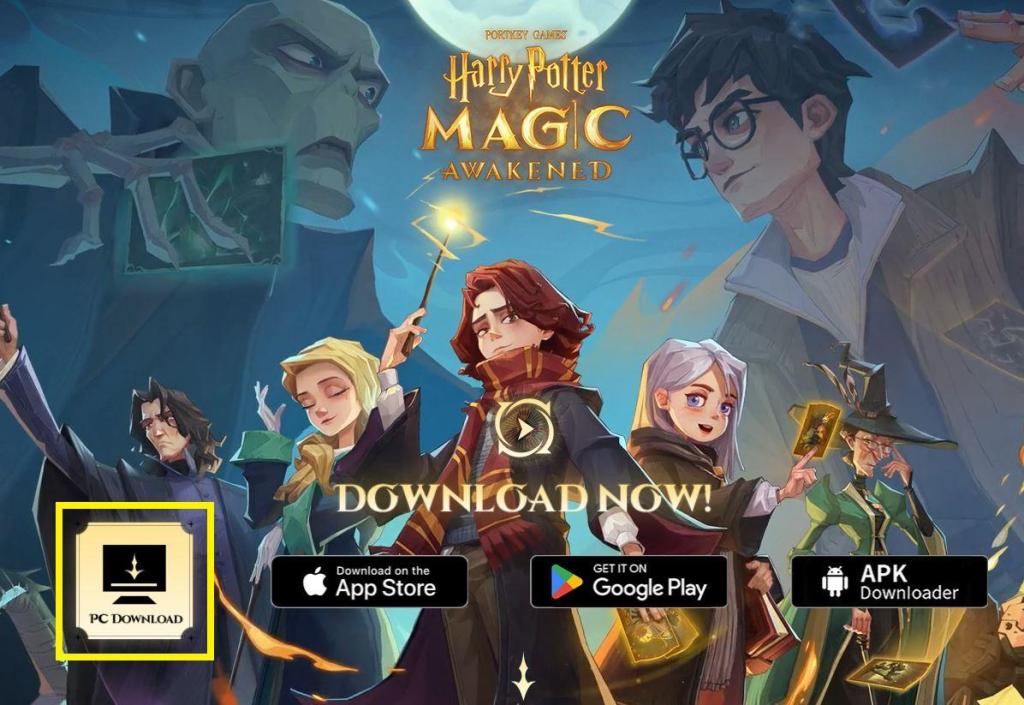
Thankfully, it is possible to play Harry Potter: Magic Awakened using an official client developed by the game developers. However, it should be noted that this is not yet available globally and is slowly being rolled out to further regions. Keep reading below on how to download the official Harry Potter: Magic Awakened PC version if it is available in your region.
How to Play Harry Potter: Magic Awakened on PC?
If you want to play Harry Potter: Magic Awakened on PC, you will need to follow these simple steps:
- Access the official website of Harry Potter: Magic Awakened
- Click on the “PC Download” button.
- Open the HPMA_setup_official.exe file.
- Follow the instructions to install the client.
- Optionally, create an account on Loading Bay to save your data and access it on other devices.
- Click on the yellow “Download” button at the bottom right of the client.
- Click on “Play” after the files have been downloaded and the game will open.
That’s it! You can now enjoy the game experience, its stunning graphics, and immersive gameplay.
Differences between PC and Mobile Versions
If you are still thinking about playing Harry Potter: Magic Awakened on your, you may be curious to know if there are any big differences you should be aware of. Fortunately, it does not seem so apart from the below minor points:
- File size: The mobile version of Harry Potter: Magic Awakened has a file size of less than 3GB. On the other hand, the PC version is nearly 16GB in size. This is because the PC version has higher-quality graphics and more detailed textures.
- Gameplay: The gameplay is largely the same between the two versions. However, there are some small differences that you may notice. For example, the controls may feel slightly different on a PC compared to a mobile device.
Overall, Harry Potter: Magic Awakened is a game that you can enjoy on your mobile device or your PC. Each version has unique features and benefits, so you choose the right one for you.
If you prefer to use your mobile device, you may want to consider using an emulator. This allows you to keep the PC as an option for specific moments.
What is the best emulator for Harry Potter: Magic Awakened?

If Harry Potter: Magic Awakened is not yet available on PC for your regions, then it is still possible to play it using an emulator. These create virtual Android devices on your PC, enabling you to install and run Android apps seamlessly. Two of the best options available for this are:
- BlueStacks – one of the most popular emulators available. It’s user-friendly, with a wide range of features like multi-account support and simultaneous app instances.
- LDPlayer – this is another great option. Known for its speed and stability, this emulator offers ample customization options to optimize it for your needs.
More Harry Potter: Magic Awakened Guide from OCG
Join our Community
If you found this guide on how to play Harry Potter: Magic Awakened on PC useful, then join our community to be kept up to date on any new Harry Potter: Magic Awakened Guides added to the site.